Cross-source queries
Join data across Postgres, Snowflake, MongoDB, and more in a single SQL statement, no ETL pipelines required.
What is DataFusion?
Apache DataFusionis a fast, extensible query engine written in Rust. It executes SQL against in-memoryApache Arrowcolumnar data, with a vectorized, streaming execution model and a pluggable table-provider interface that lets a host application feed it rows from any source. It is a top-level Apache project, used as the engine behind many analytical databases and data tools.
Arris embeds DataFusion to run cross-source queries: a single SQL statement that reads from several of your database connections at once and joins the results locally. DataFusion runs entirely in-process, so there is no cluster to deploy and no external service to call.
How it works
When you run a cross-source query, Arris hands it to the embedded DataFusion engine, which:
- Parses - the SQL is scanned for dotted table references to work out which connection each table belongs to.
- Registers - each referenced table is registered with a DataFusion session as a custom table provider backed by that connection's native driver.
- Pushes down - the largest slice of the query that touches only one connection is handed to that connection. Where Arris can write SQL back in the source's own dialect, that slice is a whole subplan: its joins, filters, aggregates, and sorts run at the source and only the subplan's result crosses the wire. Every other source gets per-table pushdown of column projections,
WHEREfilters, and row limits. - Executes - DataFusion streams what comes back as Arrow batches and runs whatever is left, the cross-connection joins, aggregations, and sorting, with its vectorized operators.
- Returns - the result is shown in the same results grid as any other query.
Subplan pushdown applies to PostgreSQL, Redshift,MySQL, MariaDB, SQLite,DuckDB, and BigQuery. Every other source stays on per-table pushdown, which is a difference in how much work the source does, not in what you can write: the same query runs either way.
Writing a cross-source query
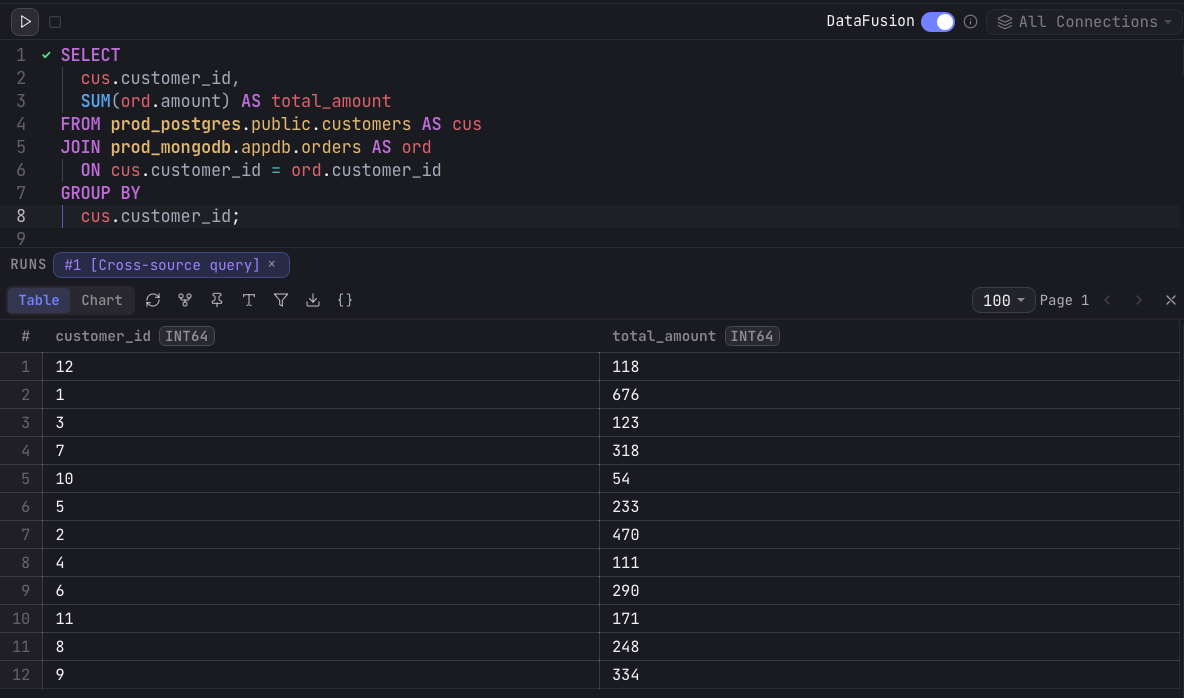
In an editor tab, flip the DataFusion toggle in the run bar. The toggle needs at least two connections configured; once it is on, the connection selector switches toAll Connections and the tab can reference tables from any of them. Reference a table with its connection name in front: connection.schema.table.
Table references
A reference is <connection>.<schema>.<table>, or<connection>.<table> for sources without schemas (e.g., for MongoDB, the database name takes the schema slot). The connection name is the name you gave the connection in Arris, and the editor tints each connection's segment in its own color. Autocomplete spans every connection, so typing a connection name and a dot suggests that connection's schemas, then its tables and columns.
Wrap any segment whose name is not a plain identifier in backticks: a name holding a space, a hyphen, a dot, or any other character outside letters, digits, and _, or one starting with a digit. So a connection named Prod DB (EU) is written`Prod DB (EU)`.public.orders, and each segment is quoted independently, as in`prod-db`.`sales.eu`.`order items`. A literal backtick inside a name is doubled. Autocomplete inserts the quotes for you.
Execution plan
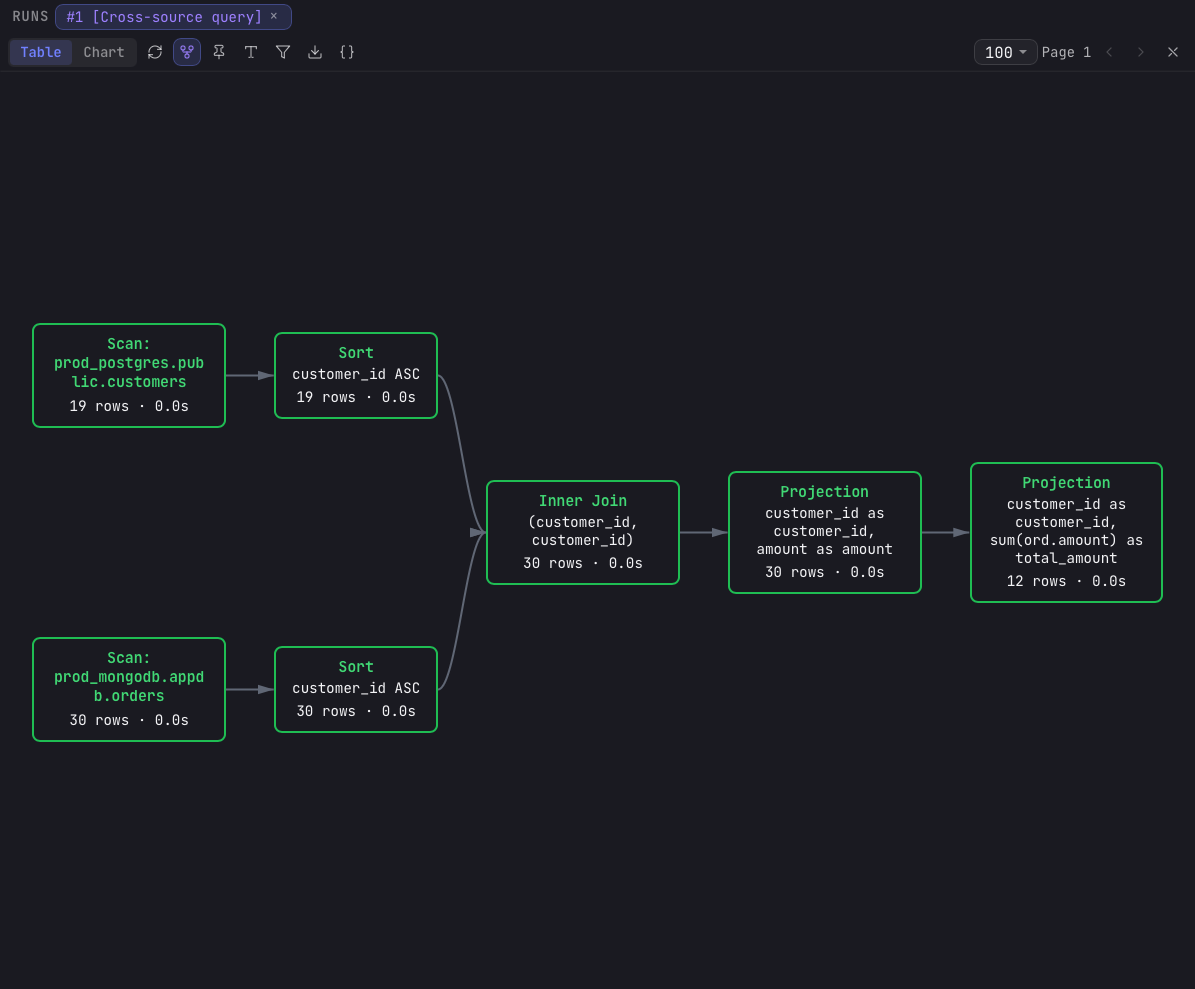
A cross-source query runs through DataFusion's physical plan, which Arris surfaces as a live execution graph. Use the Show execution plan toggle () in the results toolbar to swap the grid for a node graph of the plan: each scan, join, aggregate, sort, and the final result, with each node's status updating as the query runs.
A subplan that was pushed into its source collapses to a single scan node named after the connection (Scan: prod postgres), because the source ran that whole slice and returned one result. A table read that was not pushed down names the table instead (Scan: prod postgres.public.orders). Fewer nodes in the graph than operators in your SQL means more of the query ran at the source.
Limitations
Federation is designed for analytical and exploratory workloads. Keep these limits in mind:
- Read-only sources - a cross-source query only reads from its sources; it never writes back to them.
- Data volume - whatever a source does not compute itself is streamed into memory (DataFusion can spill to disk under pressure). Queries that pull very large tables across connections may be slow or memory-heavy, so filter at the source with
WHEREclauses. - Transactions - a cross-source query does not run in a distributed transaction. Each source is read at a point in time and may not be perfectly consistent with the others.
- Engine-specific features - DataFusion plans the query, so engine-specific functions (for example Postgres
array_agg) only work if DataFusion has an equivalent, even when the work ends up running at the source.